Don's Home Technology Character Sets Extended Char by OS Contact
Code to Character Map
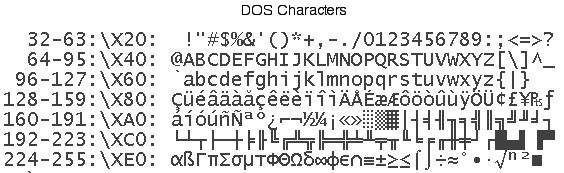
The standard ANSI or ASCII characters (decimal code 1-127) should appear the same in all Operating Systems (OSs). The extended characters (decimal 128-255) represented with raw binary codes may appear differently from OS to OS when viewed in a text editor, browser or other program. Most HTML pages use character or entity reference codes (e.g. '¢' for '¢') so they will display correctly in a browser regardles of the OS.
(See also: Character to Code Map)
You will need IE 4 (or greater) or Netscape 5 (or greater) to see some of the characters
CodeANSI* Bin
Char
Display
DecHexNameCharMacWin †DOSUNIX
12880Euro€€ÄÄÇ
12981unused �ÅÅü
13082baseline single quote‚‚ÇÇé
13183florinƒƒÉÉâ
13284baseline double quote„„ÑÑä
13385ellipsis……ÖÖà
13486dagger (single)††ÜÜå
13587dagger (double)‡‡ááç
13688circumflexˆˆààê
13789per mil‰‰ââë
1388AS caronŠŠääè
1398Bleft single guillemet‹‹ããï
1408COE ligatureŒŒååî
1418Dunused �çç
1428EZ caronŽŽéé
1438Funused �èè
14490unused �êê
14591open single quote‘‘ëë
14692close single quote’’íí
14793open double quote““ìì
14894close double quote””îî
14995bullet (large)••ïï
15096en dash––ññ
15197em dash——óó
15298tilde˜˜òò
15399unregistered
trademark
™™ôô
1549As caronššöö
1559Bright single guillemet››õõ
1569Coe ligatureœœúú
1579Dunused �ùù
1589Ez caronžžûû
1599FY diaeresisŸŸüü
DecHexNameANSIBinMacWinDOSUNIX
160A0non-breaking space  †Ýá
161A1Spanish inverted !¡¡°°í¡
162A2cents¢¢¢¢ó¢
163A3pounds££££ú£
164A4intl. monetary symbol¤¤§§ñ
165A5yen¥¥•€Ñ¥
166A6broken bar¦¦ª
167A7section symbol§§ßߺ§
168A8diaeresis¨¨®®¿¨
169A9copyright©©©©©
170AAfeminine ordinalªª™ ¬ª
171ABleft double guillemet««´´½«
172ACnot¬¬¨¨¼¬
173ADsoft hyphen-­≠‚¡
174AEregistered trademark®®ÆÆ«®
175AFmacron¯¯ØØ»¯
176B0ring (also degrees)°°ƒ°
177B1plus±±±±±
178B2superscript 2²²≤¾
179B3superscript 3³³≥„
180B4acute´´¥¥´
181B5micro symbol (or mu)µµµµµ
182B6pilcrow
(paragraph symbol)
∂ 
183B7bullet (small)··Σ…·
184B8cedilla¸¸Π½¸
185B9superscript 1¹¹π¼¹
186BAmasculine ordinalºº∫†º
187BBright double guillemet»»ªª»
188BCone-fourth¼¼°°
189BDone-half½½Ω‡
190BEthree-fourths¾¾ææ
191BFSpanish inverted ?¿¿øø
DecHexNameANSIBinMacWinDOS
192C0A graveÀÀ¿¿
193C1A acuteÁÁ¡¡
194C2A circumflex¬¬
195C3A tildeÃÃ√ˆ
196C4A diaeresisÄăŸ
197C5A ringÅÅ≈‰
198C6AE ligatureÆÆΔ 
199C7C cedillaÇÇ««
200C8E graveÈÈ»»
201C9E acuteÉÉ…Š
202CAE circumflexÊ  
203CBE diaeresisËËÀÀ
204CCI graveÌÌÃÃ
205CDI acuteÍÍÕÕ
206CEI circumflexÎÎŒ‘
207CFI diaeresisÏÏœ¦
208D0Icelandic EthÐЖ 
209D1N tildeÑÑ—‹
210D2O graveÒÒ“³
211D3O acuteÓÓ”²
212D4O circumflexÔÔ‘Œ
213D5O tildeÕÕ’¹
214D6O diaeresisÖÖ÷÷
215D7multiply symbol×××
216D8O with oblique strokeØØÿÿ
217D9U graveÙÙŸ 
218DAU acuteÚÚ/ 
219DBU circumflexÛÛ€¤
220DCU diaeresisÜÜ‹Ð
221DDY acuteÝÝ›ð
222DEIcelandic ThornÞÞÞ
223DFGerman sharp sßßþ
DecHexNameANSIBinMacWinDOS
224E0a graveàà‡ýα
225E1a acuteáá··β
226E2a circumflexââ‚’Γ
227E3a tildeãã„“Π
228E4a diaeresisä䉔Σ
229E5a ringååÂÂσ
230E6ae ligatureæÊÊ
231E7c cedillaççÁÁ
232E8e graveèèËË
233E9e acuteééÈÈ
234EAe circumflexêêÍÍ
235EBe diaeresisëëÎÎ
236ECi graveììÏÏ
237EDi acuteííÌÌ
238EEi circumflexîîÓÓ
239EFi diaeresisïïÔÔ
240F0Icelandic ethðð•
241F1n tildeññÒÒ
242F2o graveòòÚÚ
243F3o acuteóóÛÛ
244F4o circumflexôôÙÙ
245F5o tildeõõ
246F6o diaeresisööˆ–
247F7divide symbol÷÷˜—
248F8o with oblique strokeøø¯¯
249F9u graveùù˜
250FAu acuteúú™
251FBu circumflexûûš
252FCu diaeresisüü¸¸
253FDy acuteýý›
254FEIcelandic thornþþœ
255FFy diaeresisÿÿ 
This table represents the most common character mappings by OS. It was tested on Windows 98 and Mac OS 9 and OS X. Appearance may vary depending on your settings and the application. For example with Internet Explorer the binary characters display as the ANSI characters on a Macintosh with OS9 while they displayed as the native OS defaults for Win98 and Mac OS X.

The header for this page specifies <META HTTP-EQUIV="Content-Type" CONTENT="text/html; charset=iso-8859-1"> so I don't know why IE doesn't always display ANSI values.

* The ANSI characters are generated with HTML character reference coding (&#xxx;) where xxx is the decimal code while the binary code contains the actual 8-bit character which will display differently depending on your OS and application software.

† Windows 98 sometimes displays the ANSI characters and sometimes the characters listed in the Win column. I haven't figured out what causes them to change, but it must be a system setting because word processors usually use the same character map as browsers.

See also: Entity Reference codes.
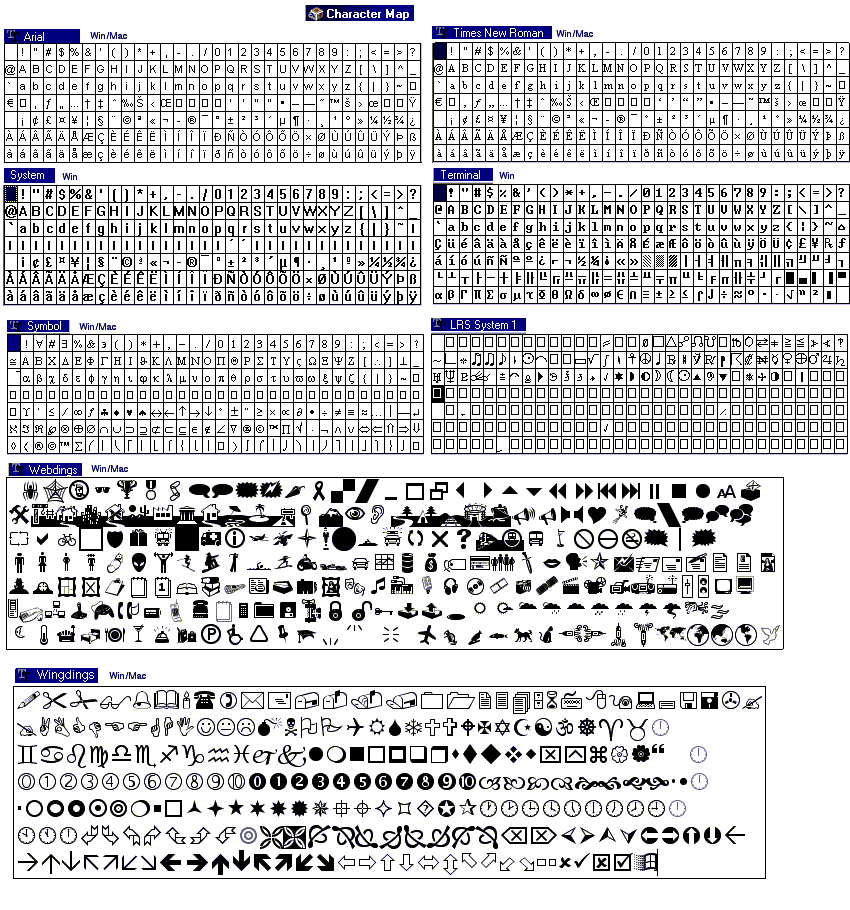
Character Maps for different fonts.
8-bit printable characters (32-255).

last updated 8 Mar 2001