Under Construction 
Contents: Overview | History | NIST model | Terms | Links
Overview:
The short definition is,
"Cloud computing is the delivery of computing as a service rather than a product, whereby shared resources, software, and information are provided to computers and other devices as a metered service over a network (typically the Internet)." Source Wikipedia
It's got a lot of press around 2011, but Larry Ellison, Oracle CEO, says their NetLedger, later NetSuite, was the same thing back in the 90's.
See Larry Ellison Invented Cloud Computing - Business Insider
It's confusing there seem to be two basic types:
Document storage:
Google Drive
Microsoft SkyDrive
Apple iCloud
Dropbox
Applications:
e.g. Instead of buying Microsoft Office (Excel, Word, PowerPoint, ...) you subscribe to service on the web
The most popular example is Google Apps:
Gmail, Calendar, , ...
Wiggio.com is another cloud computing site for small groups to share calendars, to-do lists, documents, webconferences, ...
 - Office 365 (Microsoft) is hard to categorize - Office 365 (Microsoft) is hard to categorize
See SharePoint Online for Office 365 Developer Guide
Web Conferencing (Webinars) for online meetings and seminars with application and document sharing are becoming more popular.
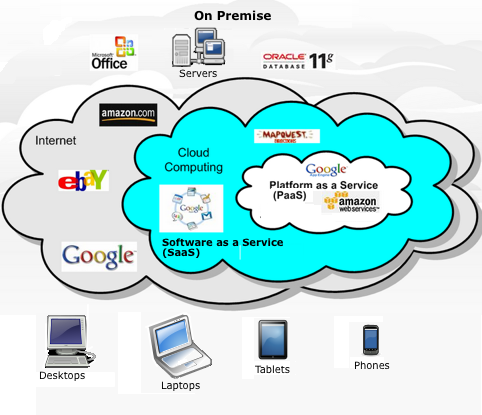
Source:MadGreek65.blogspot.com, probably derived from SalesForce.com
The term "Cloud Computing" came into popular use around 2007, although it had been used before.
For corporations it can mean outsourcing your whole computer center and IT department or just particular applications (Payroll, Customer relationship management [CRM] ).
Advantages include, no worry about fixes or software upgrades, hardware upgrades, provisioning and backups;
Runs on multiple devices and available anytime anywhere.
CRM systems like SalesForce.com, nimble.com can also subscribe to services that use the demographic information Google, Facebook and others are collecting on people for targeted customer selection.
The term "cloud" comes from Internet diagrams, typically shown as a cloud, but the concept is not new. In the past remote computing was referred to as time sharing, where links to the remote servers were provided by the Public Switched Telephone Network (PSTN) or private lines.
Individuals have used the cloud for things like email, information services (weather, news, shareware downloads, ...) and e-commerce (Amazon, eBay) for some time.
More recently, concepts like Apple Computers iCloud used for keeping files on individuals multiple devices, computers, phones, tablets synchronized have become more popular. A change to you contact list or calendar on one device will automatically be updated on your other devices. It also allows you to access your information from a computer at work or the library which does not belong to you and to share information like your calendar with friends and family.
Web Content Management Systems (WCMS) like Drupal allow you to create your website on an Internet connected computer rather than buy a copy of software like DreamWeaver to run on your own computer.
Gmail, Facebook, image hosting (Flickr, Picasa), twitter, Amazon, Ebay, Google Docs, and Google Apps could all be considered cloud computing.
The Gartner group uses Hype Cycles to predict the adoption of new technologies.
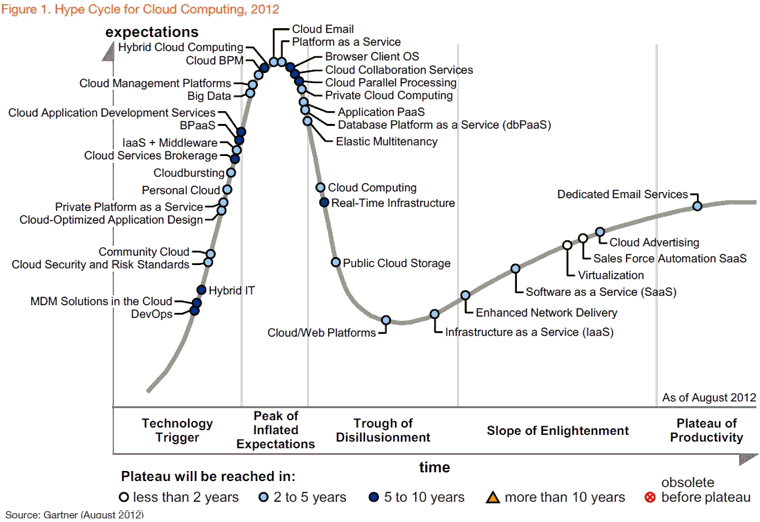
Source: Hype Cycle for Cloud Computing Shows Enterprises Finding Value in Big Data, Virtualization - Forbes
History:
The concept of running programs on remote computers is not new; It was called time-sharing in the 70's. It allowed many users to share a single computer by means of multiprogramming and multi-tasking.
The term cloud comes from network diagrams showing the Internet as a cloud.
In 1970 I used a Teletype Model 33 terminal connected to a GE timesharing system to write and execute statistical analysis programs written in BASIC.
Dartmouth (where BASIC was invented) and the Dartmouth Time-Sharing System (DTSS) were pioneers in this area.
See terminal evolution.
'60's Mainframes
'70's Dumb terminals - Mainframes
'80's Mini-computer
'90's Client Server - Desktop PCs
'00 PC servers on premises S/W - Laptop PCs, Smartphones
'10 Cloud Computing - Netbooks, Tablets, Ultrabooks
Other early applications in the late 70's and early 80's used remote computers with dial-up interfaces for information sharing Bulletin Board Systems (BBS) and online services such as CompuServe, Prodigy, The Source, usenet and America Online. An Apple II computer with a hayes modem card was a common way to access these systems, but they typically used dumb terminal emulation software to just display the date from the remote system.
These were generally referred to as thin clients.
The client-server model referred to your access device terminal or computer with terminal emulation as the client and the host computer as the server.
These were thin clients, they didn't use any of their computing power other than to display the data from the server.
As desktop computers became cheaper and smarter more processing was moved to the desktop, fat or thick clients, saving processing power on the server.
MIT's X Window system (1984) provides a set of graphic primitives allowing a terminal to have multiple windows each connected to a different server. It kind of reversed the model with one terminal serving as a host to multiple remote applications.
A web browser where basic instructions for page layout and links to compressed graphics are sent from the web server to your browser (client) where the page is displayed and graphics de-compressed.
Java script downloaded in a web page allows processing on your PC.
In the 90's people talked about going back to thin clients with something like X-windows and all your programs would be on remote servers where you would lease access to them rather purchase and install them.
Currently (2012) cloud computing can refer to private or community clouds generally used by business entities
or public clouds providing services like Gmail, Facebook, twitter, Amazon, Ebay, Google Docs, Google Apps.
Hybrid clouds combine private and public needs. e.g. Apple's iCloud, dropbox, Evernote which allow users to synchronize private data across multiple personal devices, but also share it.
Google contacts and calendar automatically synchronize between your google account in the cloud and an Android phone or tablet.
Microsoft's Windows Azure Toolbox for cloud computing.
A stack of cloud computing resources that range for developing Visual Studio and Windows Azure .
Cloud computing allows computer users to conveniently rent access to fully featured applications, to software development and deployment environments, and to computing infrastructure assets such as network-accessible data storage and processing.
NIST Model:
As implied by the NIST (National Institute of Standards and Technology) cloud computing definition, a cloud system is a collection of network-accessible
computing resources that customers (i.e., cloud subscribers) can access over a network. In general terms,
a cloud system and its subscribers employ the client-server model [Com88], which means that subscribers
(the clients) send messages over a network to server computers, which then perform work in response to
the messages received.
IDC estimates the cloud market to be $70 billion by 2015, a 25% annual increase.
A recent Gartner Group report predicted 20% of enterprises will have not IT department by the end of 2012.
Historical Perspective:
NIST Models:
To understand which part of the spectrum of cloud systems is most appropriate for a given need, an
organization should consider how clouds can be deployed (deployment models), what kinds of services
can be provided to customers (service models).
Service Models:
SaaS - Software as a Service - Service provider provides applications.
PaaS - Cloud Platform as a Service - Service provider supplies programming languages and tools for the consumer to create applications.
IaaS - Infrastructure as a Service - Service provider supplies data center infrastructure, storage and networking, plus the platform virtualization.
Deployment Models:
Private cloud
Community cloud
Public cloud
Hybrid cloud
Another NIST view is
Source: NIST Special Publication 800-146, May 2011
Terms:
Automation - Little human interaction
AJAX- Asynchronous JavaScript and XML
Client-Server - A distributed computing architecture where users have a terminal
or PC (client) to access information on a remote computer (server).
CMS - Content Management System
Fat client - A termal or PC that does processing on information sent from a server,
rather than just displaying it.
FIPS - Federal Information Processing Standards
FISMA - Federal Information Security Management Act
HTTP - HyperText Transfer Protocol
HTML - HyperText Markup Language
IMAP - Internet Message Access Protocol
IaaS - Infrastructure as a Service
IAP - Internet Access Provider - Verizon, AT&T, Comcast, Cablevision (Optimum Online), ...
IPsec - Internet Protocol Security - Adds authentication and encryption to internet packets
JavaScript - A scripting programming language typically imbedded in web pages
to do local processing from a web browser.
LAN - Local Area Network
MVC - Model-View-Controller
NIST - National Institute of Standards and Technology
PaaS - Cloud Platform as a Service
POP - Post Office Protocol
Push - Pull - Most Internet interaction is Pull, the user initiates a request for information.
In push technology a user typically subscribes to a service
and the server sends information as it is available.
Chat systems are sometimes called push systems because
messages are sent as soon as they are entered.
RDBMS - Relational Database Management System
SaaS - Software as a Service
SSL - Secure Sockets Layer
Thin client - A terminal or PC which just displays information sent from a server
without local processing.
Timesharing - Many users share a single computer by means of multiprogramming and multi-tasking.
Virtuilazation - Sharing a resource (hardware, Network) by synthesizing several
smaller virtual resources on one physical resource.
VLAN - Virtual Local Area Network
VM - Virtual Machine
VMM - Virtual Machine Monitor
VPN - Virtual Private Network
W3C - World Wide Web Consortium
WAN - Wide area network
XML - Extensible Markup Language
References:
[Com88] Douglas Comer, "Internetworking with TCP/IP Principles, Protocols, and Architectures,"
Prentice-Hall, Inc., 1988, ISBN 0-13-470154-2.
Links:
Enterprise Initiatives: Cloud Computing: Demystifying Cloud Terminology
Cloud computing and the Internet part I | E-crime Expert blog
Google Apps
SalesForce.com Service Cloud
Automating The Cloud To Drive ROI | TechRepublic
Cloud computing: the lowdown | Technology | The Observer
Cloud computing - Wikipedia
Google Apps helps groups build communities Ð Google Apps
IBM Cloud Computing: Overview
terminal evolution
Mini and Personal Computing History
Internet History
Internet/Hypertext Timeline
Return to computers
last updated 21 Jan 2012
| 